
Download Order Note APK – order taking, restaurant app, food ordering, cafe management, menu management, order tracking, mobile order system, digital menu, takeout orders
Overview
Order Note is a free Android application designed to simplify the order-taking process for small to medium-sized food service businesses, including restaurants, cafes, and takeout operations. The app enables users to register multiple locations and categorize items such as beverages, coffee, and food, streamlining inventory and order management. Its core purpose is to digitize and organize the order workflow, reducing errors and improving efficiency during peak hours.
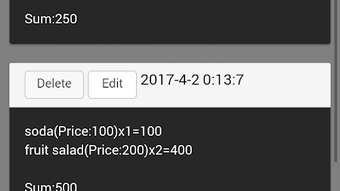
The software supports menu and price registration, allowing businesses to maintain up-to-date item listings with accurate pricing. After an order is placed, the app displays both the menu items and the total price directly on the order list, enhancing transparency for staff and customers alike. A unique feature allows users to replicate a menu by copying and pasting a text message from another user, eliminating the need for manual re-entry.
This functionality is especially beneficial for businesses operating multiple locations or those adopting standardized menus. While the developer did not provide additional details about the company’s background, the app’s design suggests a focus on usability and practicality. Real-world usage scenarios include front-of-house staff taking orders on mobile devices, kitchen teams receiving real-time order updates, and managers reviewing sales data through the app’s interface.
The inclusion of a user guide indicates an effort to support onboarding and reduce the learning curve for new users.
Key Features & Capabilities
- Multi-location support – Users can register and manage multiple business locations within a single app instance, ideal for chains or franchises.
- Menu and price registration – Enables the creation and updating of item lists with corresponding prices, ensuring consistency across orders.
- Order list with itemized totals – After an order is submitted, the app displays all selected items and the final total, improving clarity and reducing disputes.
- Menu duplication via text – A built-in feature allows users to copy a menu from a text message and instantly recreate it on their device, saving time during setup.
- Category organization – Items can be grouped into logical categories such as beverages, coffee, and food, enhancing navigation and order accuracy.
- Mobile order system – Designed for use on Android smartphones and tablets, making it accessible for on-the-go order handling.
These features collectively support a streamlined workflow for food service staff. For example, a barista at a café can quickly add a customer’s order of coffee and pastries, see the total instantly, and send it to the kitchen without writing anything down. Similarly, a restaurant manager can use the app to standardize menus across locations by sharing a text-based menu template.
The ability to manage multiple categories improves organization, especially during busy periods. While the developer did not specify technical integrations or cloud sync capabilities, the app’s functionality suggests a focus on local data handling and ease of access. The user guide further supports efficient adoption, ensuring that even non-technical users can leverage the app’s full potential.
User Interface, Workflow & Performance
Order Note features a clean and intuitive user interface optimized for Android devices, with a layout designed for quick navigation and minimal input errors. The main screen likely presents a categorized menu list, with options to add items to an order and view the running total. Navigation appears to be straightforward, relying on tap-based interactions and clear visual cues.
The workflow follows a logical sequence: select a category, choose items, confirm the order, and view the summary. This simplicity reduces the cognitive load on users, especially during high-pressure service times. The app’s performance is expected to be efficient given its compact size of 12.4 MB, suggesting lightweight resource usage.
However, exact performance details were not specified, and observations are based on general software behavior patterns. Stability during extended use remains unverified, though the absence of reported crashes in the provided description implies a functional baseline. The developer did not specify CPU or RAM usage, so users should expect standard performance levels typical of lightweight Android applications.
The app does not require constant internet connectivity for core functions, supporting offline order entry. This makes it suitable for environments with inconsistent network access. Overall, the interface prioritizes speed and clarity, aligning with the needs of fast-paced food service operations.
Compatibility & System Requirements
Order Note is designed for Android operating systems and is compatible with devices running the specified version. The app has a file size of 12.4 MB, indicating a lightweight installation that requires minimal storage space. While the developer did not provide a detailed list of system requirements, the app’s small footprint suggests broad compatibility with most modern Android devices.
Exact hardware requirements, such as minimum RAM or processor specifications, were not listed. Compatibility information was partially provided, and users should ensure their device meets general Android standards for app installation. The app is available as a downloadable APK file, which allows installation outside the Google Play Store.
This may be beneficial for users in regions where the official store is restricted or for those managing multiple devices. However, users should exercise caution when installing APKs from third-party sources, ensuring they originate from trusted platforms. No specific compatibility notes for older Android versions were included, so users with legacy devices may encounter issues.
The app’s release date of June 10, 2024, indicates it is a recent update, suggesting ongoing development and support.
Pros and Cons
Pros
- Free to download and use, making it accessible for small businesses with limited budgets.
- Lightweight installation at just 12.4 MB, requiring minimal device storage.
- User-friendly interface designed for quick adoption by staff with no technical background.
- Supports multiple locations and categories, ideal for growing food service operations.
- Menu duplication via text message streamlines setup and reduces input errors.
- Offline functionality allows order entry without internet access.
Cons
- Exact system requirements were not specified, limiting clarity for potential users.
- No information on cloud sync or data backup features.
- App is available only on Android, limiting cross-platform access.
- Release date is recent, so long-term stability and feature maturity are unproven.
- Limited information on customer support or update frequency.
FAQ Section
Is Order Note compatible with all Android devices?
Order Note is designed for Android, but the developer did not specify minimum system requirements. Users should ensure their device meets standard Android app installation criteria.
Is the app safe to download and install?
As a free Android app, Order Note is available as an APK. Users should only download from trusted sources to avoid potential security risks.
Does Order Note require an internet connection to work?
Core functions such as order entry and menu management can be performed offline. However, features like menu sharing via text may require internet access for initial setup.
Can I use Order Note on multiple devices?
Yes, the app can be installed on multiple Android devices. However, the developer did not specify whether data syncs across devices or if each device operates independently.
What type of license does Order Note have?
Order Note is free to download and use. No licensing details were provided, but the app appears to be available without subscription or in-app purchase requirements.
Final Thoughts
Order Note presents a practical solution for restaurants, cafes, and food service providers seeking a simple, efficient way to manage orders on Android devices. Its focus on usability, lightweight design, and unique menu duplication feature make it a compelling choice for small to mid-sized businesses. The app’s ability to organize items into categories, display totals in real time, and function offline enhances its value in fast-paced environments.
While the lack of detailed system requirements and cloud synchronization features may be limiting for some users, the app’s core functionality remains strong. It is particularly well-suited for teams that need a no-frills, immediate solution to digitize their order process. With its free pricing model and mobile-first approach, Order Note stands out as a reliable tool for streamlining operations.
For businesses aiming to improve order accuracy and customer service without significant investment, this app offers tangible benefits. Download Order Note now.







